
 Bifrost Docs
Bifrost metadata
When downloading a collection, a COCO JSON file is included in the ZIP archive. In addition to the standard COCO fields, the file would also contain metadata specific to Bifrost renders.
This custom metadata is located under the images and annotations sections of the JSON, within a field named bifrost_metadata.
Example format
{
    "images": [
        {
            "id": 1,
            "file_name": "e8c419d6-e9d8-49e0-ad43-161aadc4b9c9/RGB_camera_0000.jpg",
            "bifrost_metadata": {
                "bifrost_camera_position": {
                    "x": 0,
                    "y": 0,
                    "z": 1000
                },
                "bifrost_camera_rotation": {
                    "roll": 0,
                    "pitch": -30,
                    "yaw": 0
                },
                "bifrost_camera_heading": 0.0,
                "bifrost_camera_fov": 90.0,
                "bifrost_segmentation_path": "e8c419d6-e9d8-49e0-ad43-161aadc4b9c9/Segmentation_camera_0000.tif",
                "bifrost_camera_id": "camera"
            }
        }
    ],
    "annotations": [
        {
            "id": 1,
            "image_id": 1,
            "bifrost_metadata": {
                "bifrost_object_id": "boat_1",
                "bifrost_heading_absolute_degrees": 90.02760314941406,
                "bifrost_distance_to_camera_m": 34.114948730468754,
                "bifrost_absolute_position_m": {
                    "x": 32.7561962890625,
                    "y": 0.5690269851684571,
                    "z": 0.4848830032348633
                },
                "bifrost_absolute_rotation_degrees": {
                    "roll": -0.8629000186920166,
                    "pitch": 90.02760314941406,
                    "yaw": -1.8286000490188599
                },
                "bifrost_absolute_centroid_position_m": {
                    "x": 33.5,
                    "y": 1.2,
                    "z": 5.8
                },
                "bifrost_absolute_size_m": {
                    "x": 20.299549560546875,
                    "y": 21.7643212890625,
                    "z": 65.81230957031251
                },
                "bifrost_absolute_cuboid_positions_m": [
                    {"x": 23.15, "y": -9.68, "z": -27.12},
                    {"x": 43.85, "y": -9.68, "z": -27.12},
                    {"x": 23.15, "y": 12.08, "z": -27.12},
                    {"x": 43.85, "y": 12.08, "z": -27.12},
                    {"x": 23.15, "y": -9.68, "z": 38.69},
                    {"x": 43.85, "y": -9.68, "z": 38.69},
                    {"x": 23.15, "y": 12.08, "z": 38.69},
                    {"x": 43.85, "y": 12.08, "z": 38.69}
                ],
                "bifrost_scale": {
                    "x": 1,
                    "y": 1,
                    "z": 1
                },
                "bifrost_in_frame": true,
                "bifrost_percent_visible": 27.425251338294817
            }
        }
    ]
}
Image level metadata
By default, the following information is exported under the images.bifrost_metadata field:
Field Name |
Unit |
Description |
|---|---|---|
|
Meters |
Camera position in Bifrost world coordinates. |
|
Degrees |
Camera rotation relative to Bifrost world. |
|
Degrees |
Camera heading relative to Bifrost world. |
|
Degrees |
Horizontal field of view of the camera. |
|
Path to the segmentation mask of the image. |
|
|
Id of the camera that captured the image. See Multiple cameras. |
Object level metadata
Note
Object level metadata is only available for assets added to the World via
world.add.
Objects such as Sky, Land, and Water would not have any associated metadata.
By default, the following information is exported under the annotations.bifrost_metadata field:
Field Name |
Unit |
Description |
|---|---|---|
|
The ID of the object. This can be used for tracking tasks. |
|
|
Degrees |
Object’s heading relative to Bifrost world. |
|
Meters |
Distance from the camera to the center of the object’s base. 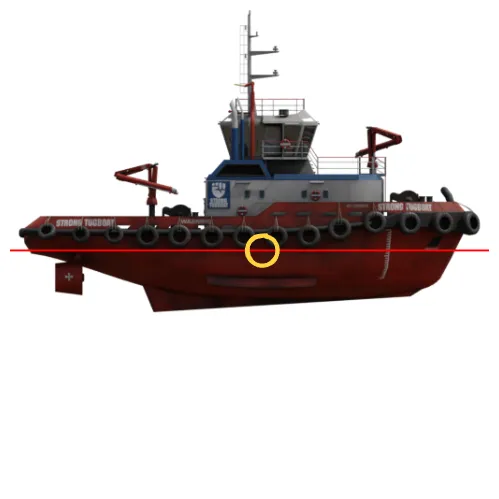
|
|
Meters |
Object position in Bifrost world coordinates. |
|
Degrees |
Object rotation relative to Bifrost world. |
|
Meters |
Object’s centroid position in Bifrost world coordinates. |
|
Meters |
Object size in x, y, and z dimensions, which corresponds to depth, width, and height. |
|
Meters |
Array of 8 corner positions of the object’s 3D bounding cuboid in Bifrost world coordinates. 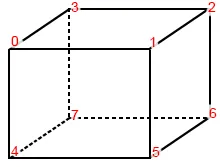
|
|
Scale (multiplier) applied to the object in each dimension. |
|
|
Boolean |
Whether the object is in the frame. An object is considered to be in frame if at least one pixel of the object is visible in the image. |
|
Percentage |
Percentage of the object that is visible in the image. This is calculated as the ratio of unobstructed visible object pixels to the total object pixels as seen from the current camera viewpoint. |
*If you require a different method of distance calculation, please let us know!
Adding custom metadata
Note
Custom metadata can currently only be added at the image level.
Annotation-level custom metadata is not supported at this time.
Add custom metadata for each frame using
scenario.set_metadata_keyframe.
scenario.set_metadata_keyframe(<frame_index>, <key>, <value>)
An important behavior to note is that metadata keys set in a previous frame will automatically persist
into subsequent frames unless explicitly updated. To remove a key from a specific frame, set its value
to METADATA_UNSET_KEY.
Here is a full example of how to add custom metadata
from bbi import *

world = World(...)
scenario = world.new_scenario(3)
# Frame 0
scenario.set_metadata_keyframe(0, "weather", "rainy")
scenario.set_metadata_keyframe(0, "sun", {"elevation": 30, "azimuth": 180})
scenario.set_metadata_keyframe(0, "special_key", 1)
# Frame 1
scenario.set_metadata_keyframe(1, "weather", "sunny")
scenario.set_metadata_keyframe(1, "special_key", METADATA_UNSET_KEY)
# Frame 2
scenario.set_metadata_keyframe(2, "weather", "cloudy")

scenario.render()
Example output
{
    "images": [
        {
            "id": 1,
            "file_name": "e8c419d6-e9d8-49e0-ad43-161aadc4b9c9/RGB_camera_0.jpg",
            "bifrost_metadata": {
                "weather": "rainy",
                "sun": {
                  "elevation": 30,
                  "azimuth": 180
                },
                "special_key": 1,
            }
        },
        {
            "id": 2,
            "file_name": "e8c419d6-e9d8-49e0-ad43-161aadc4b9c9/RGB_camera_1.jpg",
            "bifrost_metadata": {
                "weather": "sunny",
                "sun": {
                  "elevation": 30,
                  "azimuth": 180
                },
            }
        },
        {
            "id": 3,
            "file_name": "e8c419d6-e9d8-49e0-ad43-161aadc4b9c9/RGB_camera_2.jpg",
            "bifrost_metadata": {
                "weather": "cloudy",
                "sun": {
                  "elevation": 30,
                  "azimuth": 180
                },
            }
        }
    ],
}